
In Part1 we focused on the basics of configuring and managing Partitions and publishing them as Highly Available objects, by attaching a suitable HA policy.
Before we look further into some of the potential deployment options, its worth understanding what it is you are trying to achieve while taking into consideration any physical constraints, such as limited, finite or pseudo–unlimited inter-site bandwidth.
Just how highly-available is your environment?
In a perfect world, your applications, OS and the storage will all be HA capable. The key factor here is the application/OS itself. If your application/OS is clustered, and can have many different instances accessing the same data – simultaneously, then having a fully HA environment will require some kind of application/OS provided co-ordination in the event of a site loss.
Classic examples of things than can make use of active/active site-aware storage would be the likes of Oracle-RAC as an application aware HA solution, or VMware/Windows clustering (as OS aware HA solutions). These solutions usually have their own ‘quorum’/’witness’/’locking’ mechanisms to ensure that :
- No two instances overwrite the same data at the same time (write consistency)
- Split-brain, or site loss events are handled seamlessly
Split-brain decisions will happen independently of any storage based quorum / split-brain handling and so care should be taken to ensure all quorum devices will make the same decision ! i.e. having the same preferred sites defined at the application, OS and storage – where possible!
How much inter-site bandwidth do you have available?
As with all replication functions, writes are everything. All forms of synchronous replication need to be able to cope with your peak write bandwidth. Even asynchronous replication may require as close to peak write bandwidth if you wish to maintain minimal RPO.
Sizing of the ISL at it’s simplest level therefore requires enough site to site bandwidth to cater for your peak write workload on the volume groups/Partitions that are in HA. However, in a truly uniform access deployment, the read bandwidth may also need to be taken into consideration under certain failure scenarios.
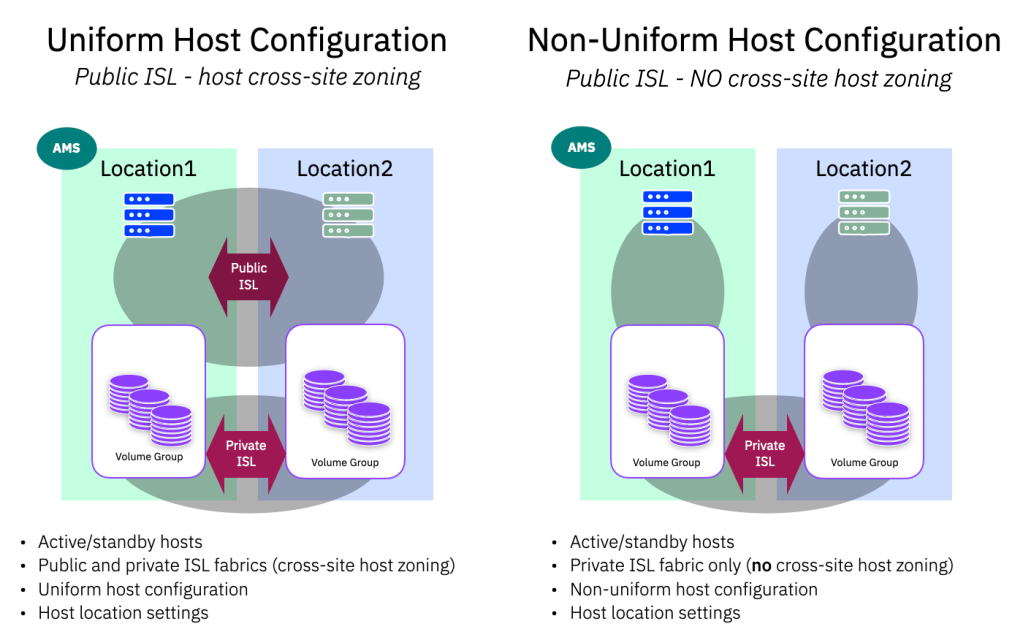
What do we mean by uniform vs non-uniform deployments?
If you have been using our previous HA solutions, such as SVC Enhanced Stretched Cluster, or HyperSwap, we talked about public and private ISL links. The public ISL being host facing and the private ISL being storage facing. By creating this separation (often with QoS applied to the private ISL) we could guarantee that the storage to storage replication data (writes) were afforded all they needed to meet your peak write bandwidths.
The public ISL meant that host servers in one site could see paths to the storage in the other site, thus creating a “uniform” access mode and allowing hosts at either site to continue to operate (with increased latency) via the public ISL if the local storage system failed or had connectivity issues.
So when we talk about uniform host configuration, we are referring to configurations where all hosts have visibility and are zoned to both storage systems. By default, the location (site-awareness) you define will dictate which system is used in preference – so that I/O traffic stays local in normal running situations. Clearly if a host has to access the storage from the opposite location (in a failure scenario) there will be added I/O latency, whatever the ISL adds, and any read / write operations have to traverse the public ISL. Thus in a uniform configuration, the additional read bandwidth should be considered when sizing the overall ISL. The additional link latency should be also be noted. In this scenario, as we have lost one system, we won’t be replicating at this time, and this won’t be consuming write bandwidth in the private ISL.
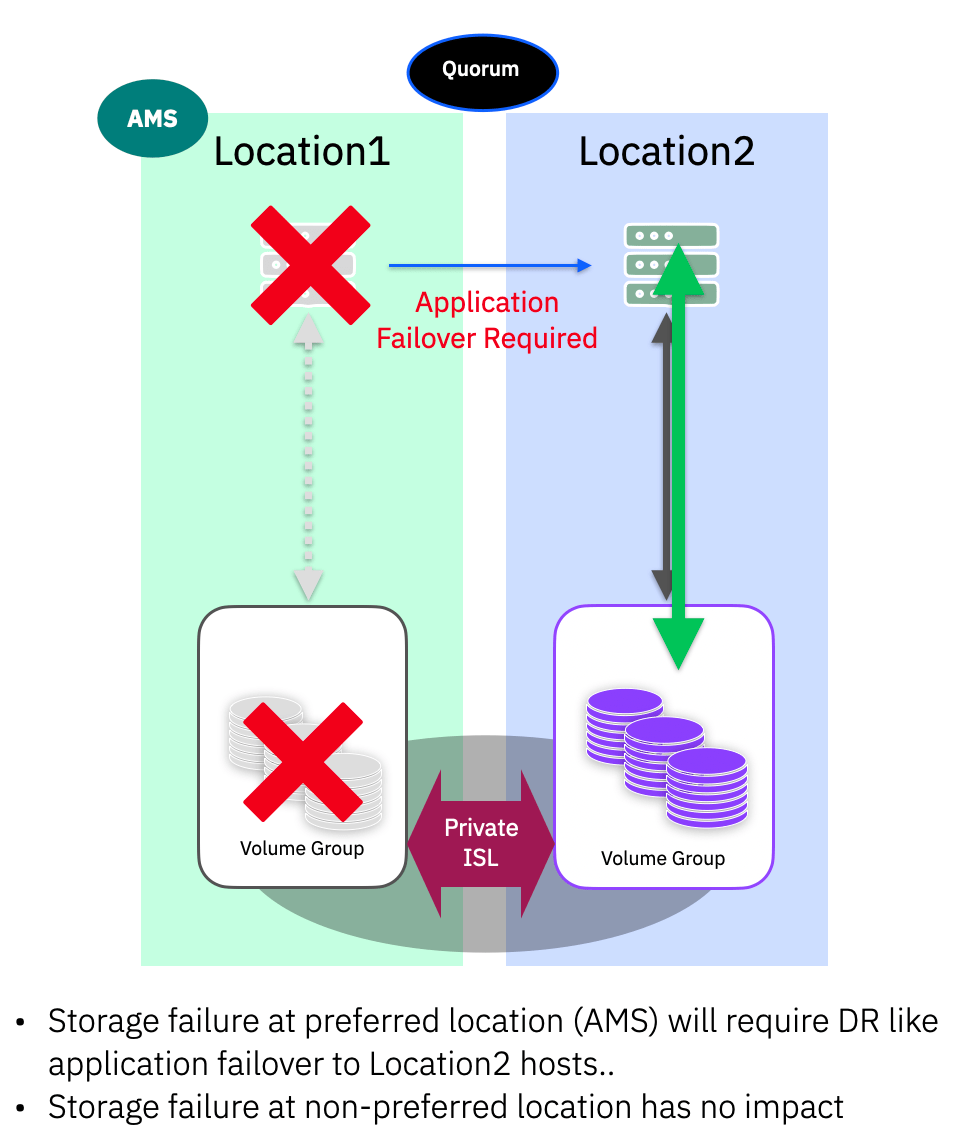
A non-uniform host configuration does not provide the public ISL connectivity, only the private ISL. The advantage here is that we do not need to consider read traffic in the ISL sizing, however a loss of the local storage system will result in hosts at the local location losing access to storage, and will require an application/OS level failover (which may or may not require manual intervention)
A note about location (or site) definitions.
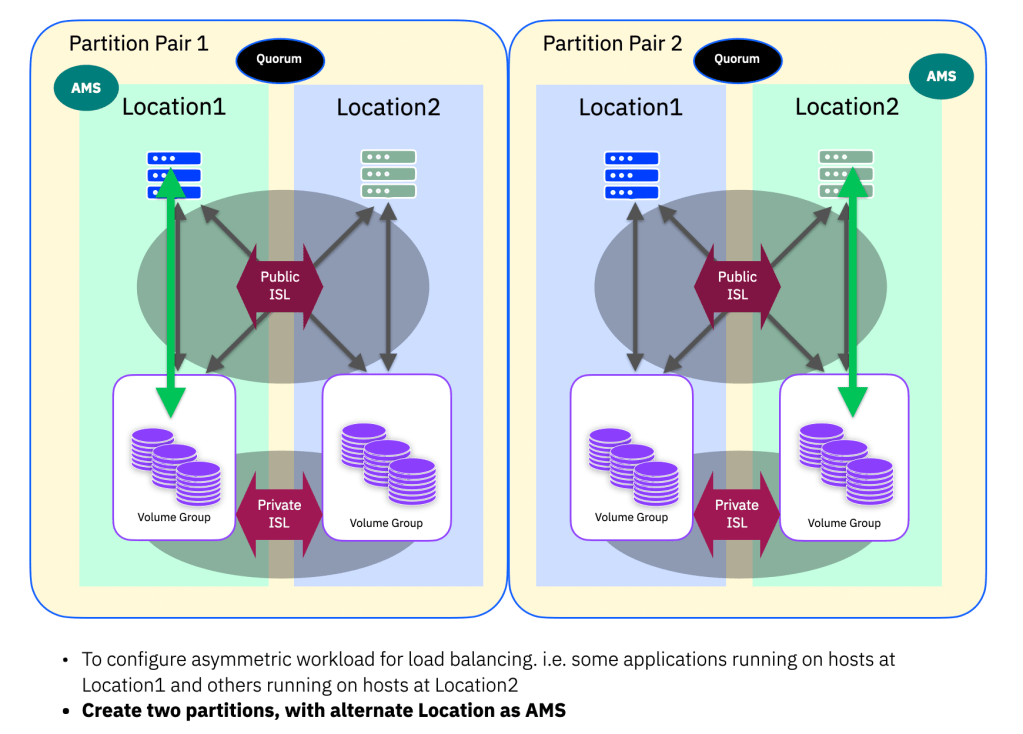
Unlike previous HA solutions, where nodes and hosts were associated with a “site” that was used to adjust how we reported the optimised vs non-optimised preferred pathing, PBHA uses a “location” field that can be assigned to host objects only. The location itself is the name of the system in that location. Because PBHA is between systems (not between IO groups as with HyeprSwap), we have a distinct system at each location.
Common Deployment Models
Now that we have the terminology and options laid out, lets look at what we see as the three main (and two sub-type) deployment models.
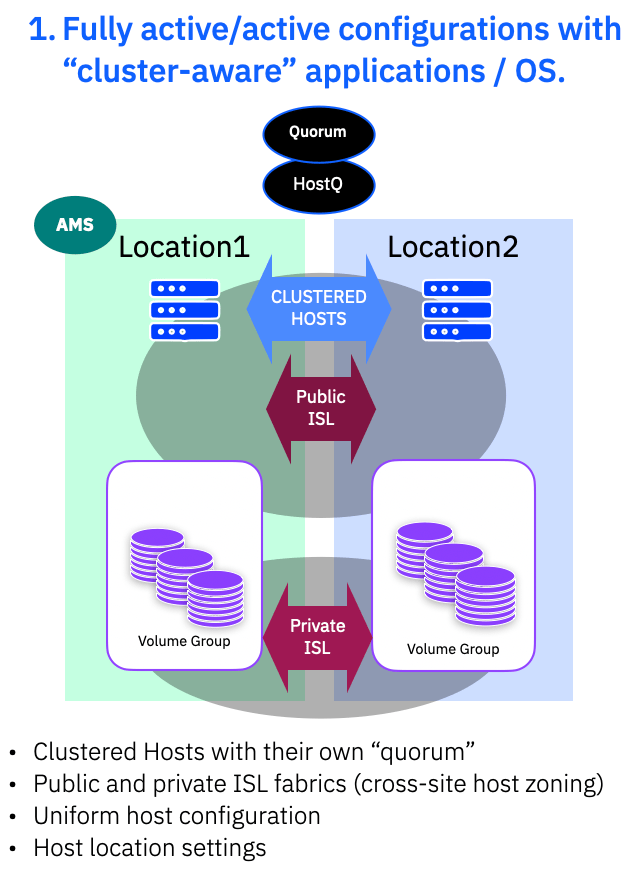
1. Fully active/active with “cluster-aware” applications / OS.
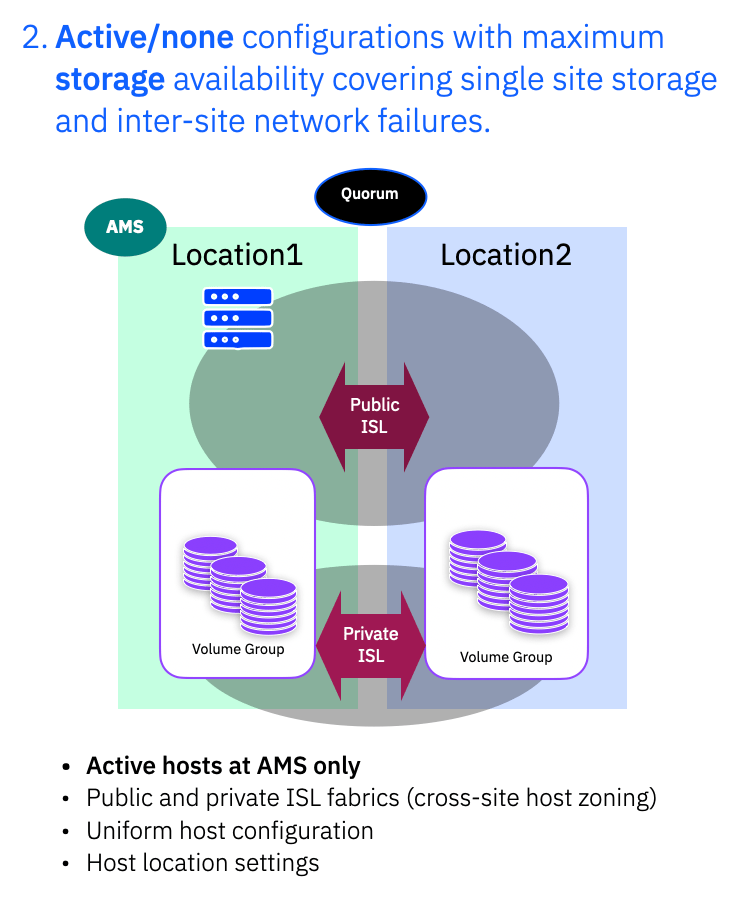
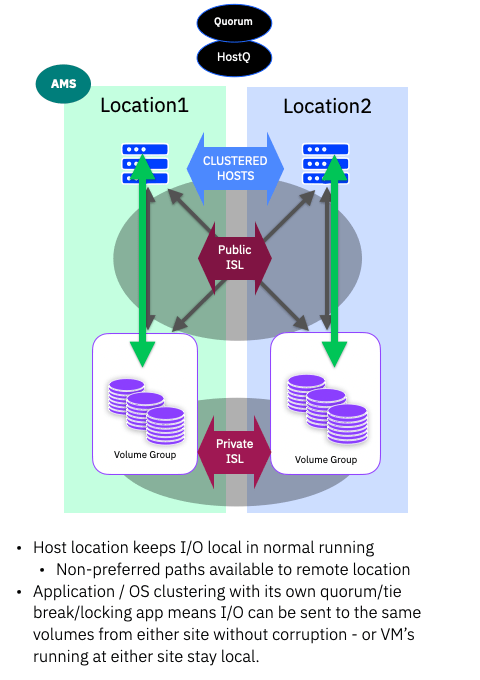
Here we have everything active/active with clustered application/hosts, uniform host configuration with host locations defined. The public ISL provides the host cross site access for uniform mode and the private ISL fabrics provide the data mirroring via the storage system.
You can set QoS on the Private ISL if (as most people do) you are sharing the same ISL physical links with the Public ISL. This guarantees the bandwidth for write mirroring and should be set to cope with your peak write bandwidth.
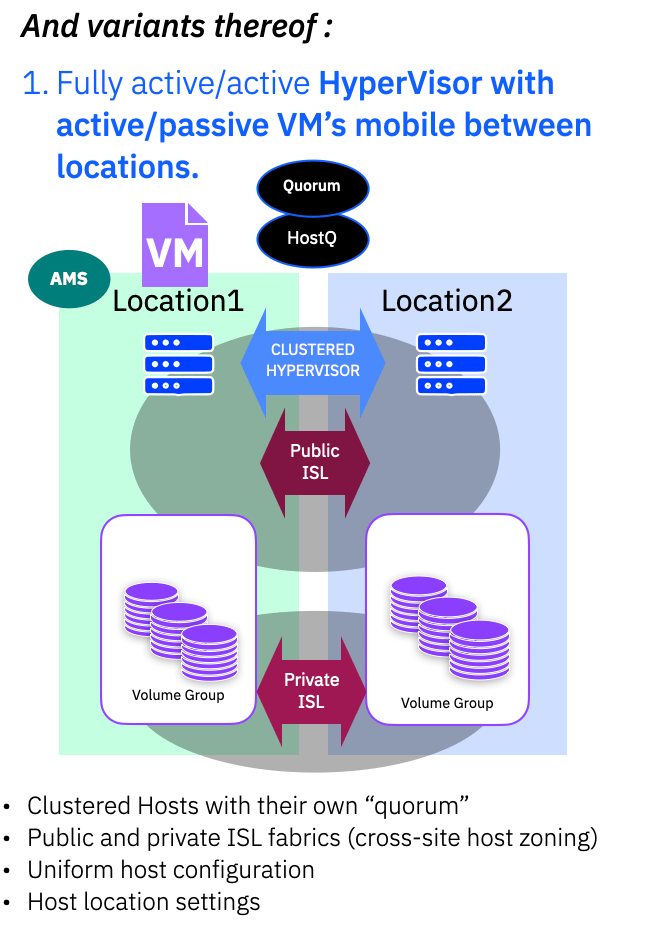
A common sub-type variant of this configuration would make use of single site applications running on a clustered OS – for example a clustered Hypervisor, where a VM can move between sites and could at any time be running at either site, making use of VM failover in the event of connectivity or storage issues.
2. Active/Standby
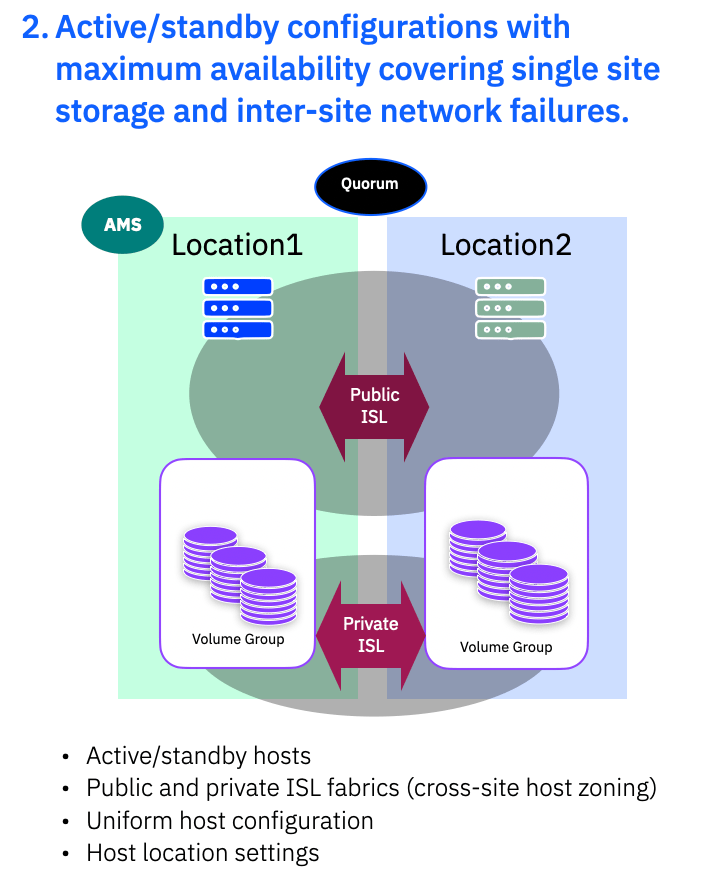
Here we have at the host side running in active/standby with single site application/hosts, uniform host configuration and host locations defined. The public ISL provides the cross site host access, providing uniform host access, and the private ISL fabrics provide the data mirroring via the storage system.
Just as with 1. above, you can set QoS on the Private ISL if, as most people do, you are sharing the same physical ISL links with the Public ISL. This guarantees the bandwidth for write mirroring and should be set to cater for your peak host write traffic.
In this mode you generally have applications running in a preferred location and if that location suffers a failure you will need to bring up the application at the second location – some OS/HyperVisor may provide tooling to aid in such scenarios.
A sub-type variant of this configuration is when you only have host servers at one location. Active/none means that your storage is highly available, but if an issue takes out the entire site, you do not have a second set of hosts to failover to.
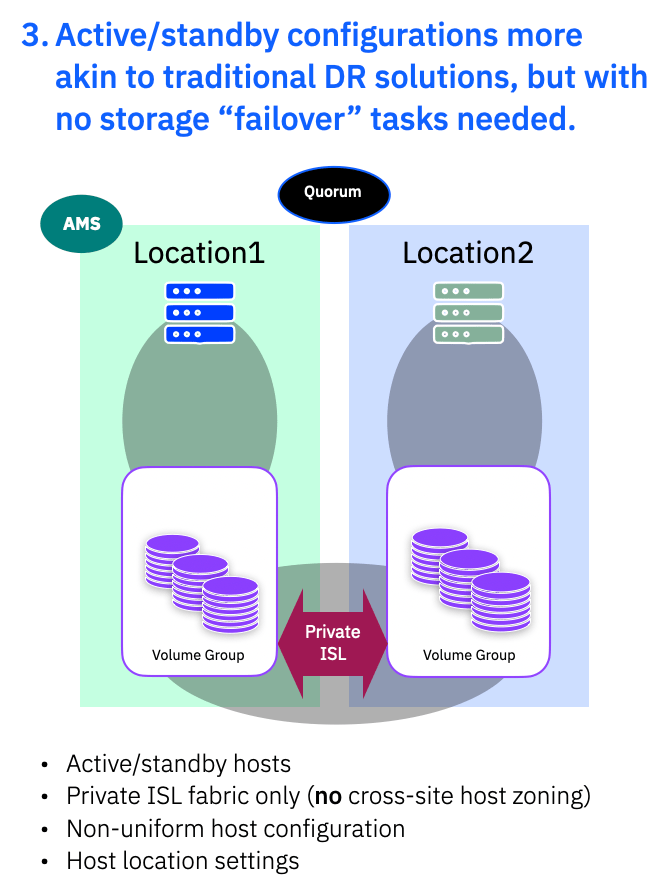
3. Active/Standby more akin to traditional DR
The final deployment style is more akin to building a traditional DR solution. There is added HA compared to a normal synchronous DR solution, so there is no need to consider the storage when a “failover” is needed. The storage is HA, so is always available at both sides, but here you are building a non-uniform configuration. You do not have the Public ISL definitions, so hosts can only access local storage systems. You would likely still have location information assigned to hosts, but it isn’t strictly necessary as the hosts can only see local storage paths.
You do not need to worry about QoS on the public ISL, as there is no sharing of the link with host traffic.
This type of configuration could be used to build ‘MetroMirror‘ like synchronous replication solutions until PBR sync toplogies are available.
However take great care to ensure there are no active applications running at Location2, as this could silently cause data corruption!
Part 2 – Conclusions
In part 2 we have explained uniform and non-uniform host access, location (preferred site) definitions and discussed the 3 commonly deployed configurations to meet the most pervasive high-availablity solutions we see people wanting to define.
In part 3 (coming soon) – we will look in detail at each of these deployment models and what happens when storage, network or site failures occur.

 Barry Whyte and Andrew Martin : IBM Storage
Leave a reply to Anonymous Cancel reply