
Last week we announced the pending availability (25th July) of v9.1.0 of Storage Virtualize for FlashSystem and SVC platforms. In various “pre-announce” NDA discussions at recent User Groups, a few people queried the version number. Initially I thought people would be asking why v9? However it seems more people were asking “What happened to 9.0?”.
Let me start by discussing why v9? With the recent introduction of FlashSystem grid scale out capabilities, the introduction of Storage Partitions and Storage Insights AIops integrations, it was felt that with the introduction of a few key additional capabilities in this release, FlashSystem grid is now fully prime-time and caters for the vast majority of end user use cases, so time to mark that with a major version update.
Secondly, why not 9.0 – well those of you that have been using “SVC” based products for years will know we have never had an X.0 version… Even the very first release back in 2003 was 1.1 – a decision that was loosely based around potential negative sub-conscious reaction! I guess its been a few years since 8.1.0 was released, which was also the first v8.
What do I get with v9.1.0
Well if you remember our recent release strategy, after v8.7.0, v9.1.0 will become the latest LTS release, rolls up everything in the CD releases of 8.7 ( 8.7.1, 8.7.2 and 8.7.3 ) as well as a few new features :
- Scalability enhancements for FlashSystem grid and parititons
- Added support for objects and management of partitions
- Separation of duties for use specific certificates
- Security enhancements, updated inference engine and reporting of anomalies within native GUI*
- VASA5 support
- Various miscelaneous enhancements and continued GUI modernisation
FlashSystem grid, Replication and Storage Partition Enhancements
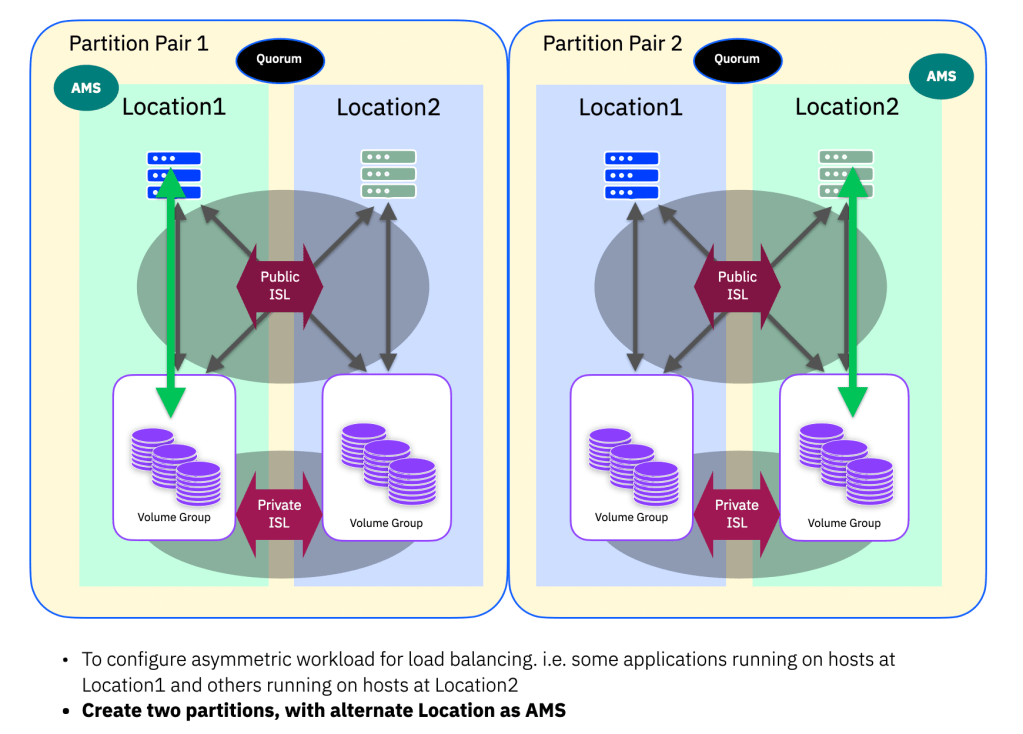
Up to 32 systems can now be added to a FlashSystem grid (up from 8 previously) and each system can now manage up to 32 partitions (up from 4 previously). In almost all customer scenarios these new scalability improvements should allow for all your systems to be added to just one grid if necessary. Similarly, the increase the the number of partitions per system allows for use cases where you wish to further sub-divide the system for simplified management.
Improved Replication and Partition Capabilities
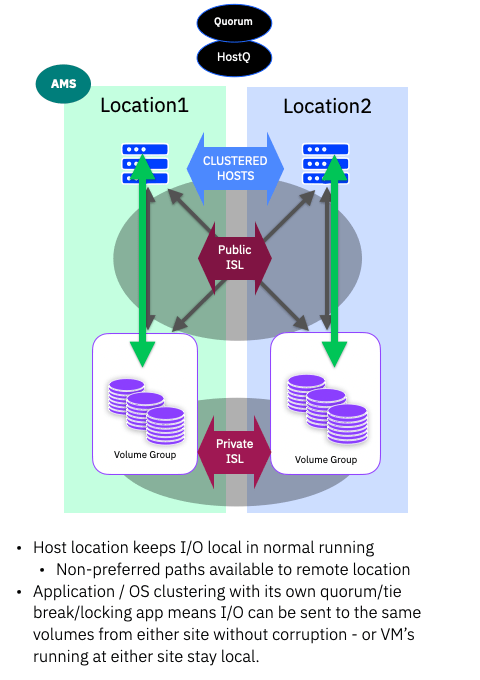
Host Cluster object support within Storage Partitions is one of the most frequently requested enhancements for storage partitions. With 9.1.0 you can now import existing host clusters, create new or remove hosts clusters from partitions. In addition, host objects can be added or deleted from host clusters that are within partitions. Creating and removing shared mappings is also supported. Host clusters can be renamed. Uniform and non-uniform host access modes are both supported.
Volumes can now be moved between Volume Groups within the same partition. There is no impact to HA if it is applied to both volume groups. If volumes are currently being replicates via PBR, they must be moved into an non-replicated volume group and will require a full re-sync if PBR is re-enabled.
PBR and PBHA objects can now be renamed. Replicated (PBR and PBHA) volumes, volumes groups, hosts, host clusters and partitions can now be renamed. The rename is propagated to the remote systems with no impact to DR or HA operations.
PBR and PBHA volumes can now be expanded. No impact to HA volumes, a minimal extended RPO may be seen on DR volumes.
Up to 132 replication policies per system (up from 32) to cater for Partition based policies in addition to those outside of partition scope.
Per Partition IP address allocation. The start of a bigger push towards multi-tenant FlashSystem grid, you can now assign a management IP to each partition. For now this allows login to the same system, but as the multi-tenant improvements are updated this will provide partition scope login capabilities.
Use-based Certificates
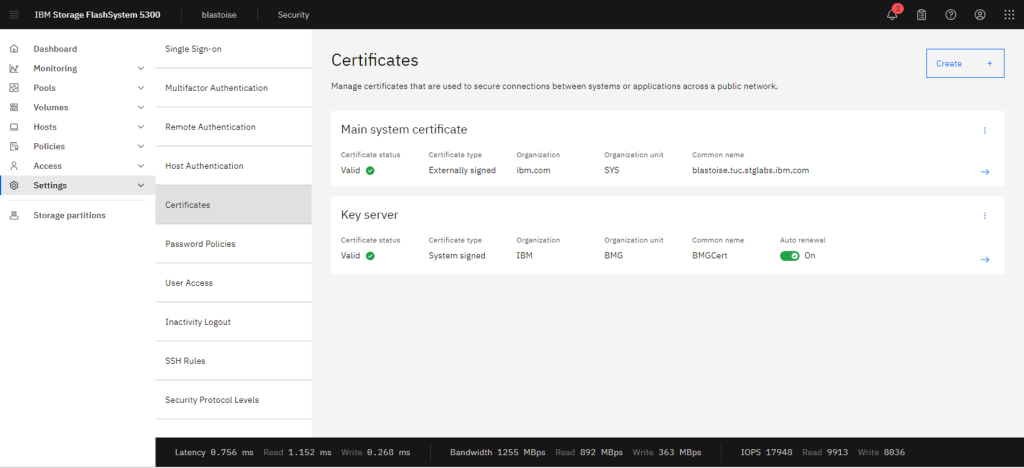
It has become necessary to start deploying more than just one “system level” encryption certificate as the systems make more use of certificates for encrypted management and data traffic. Initially this release separates :
- Key Server specific certifcates – for external certificate management of encrypted drives
- Internal system communication certificates – i.e. for FlashSystem grid, PBR and PBHA
In the future we expect this list to grow, for example per-partition certificates for management and communication.
Security and Anomaly Detection Enhancements
Secure File Transfer Protocol (sftp) has been added, and the native “scp” has been deprecated – scp is stil supported, but under the covers will use sftp. Same usage as always, but can now be used in interactive mode, for example :
sftp -P22 adminuser@systemThis also means you can use sftp client applications.
Anomaly detection status has been integrated into both the CLI and GUI. You can check the status, including model versions and if it supports Volume Group level detection for example.
# lsanomalydetection -delim :
inferencer_version:0.1.7.1
model_version:0.3.24.0
volume_group_support:yes
active_array_count:1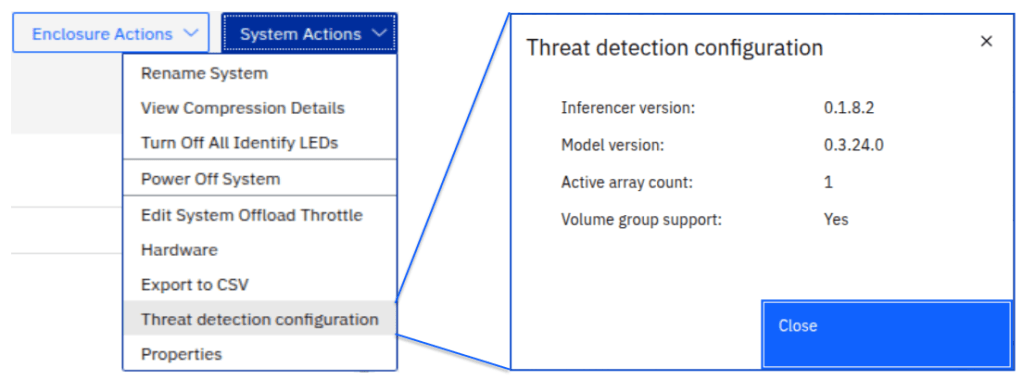
The DRAID array properties are updated to include a field to denote that anomaly detection is active, and now DRAID1 arrays also support the anomaly detection features if they are created at 9.1.0 or beyond.
In addition, if a threat has been detected, and is reported up to Storage Insights Pro – with the addition of the “API KEY” (covered below) snapshots will be marked with the anomaly event log number if they were taken after an anomaly was detected, and if the event is not marked as fixed. This allows you to understand your recovery options, should this be a genuine ransomware or corruption attack.
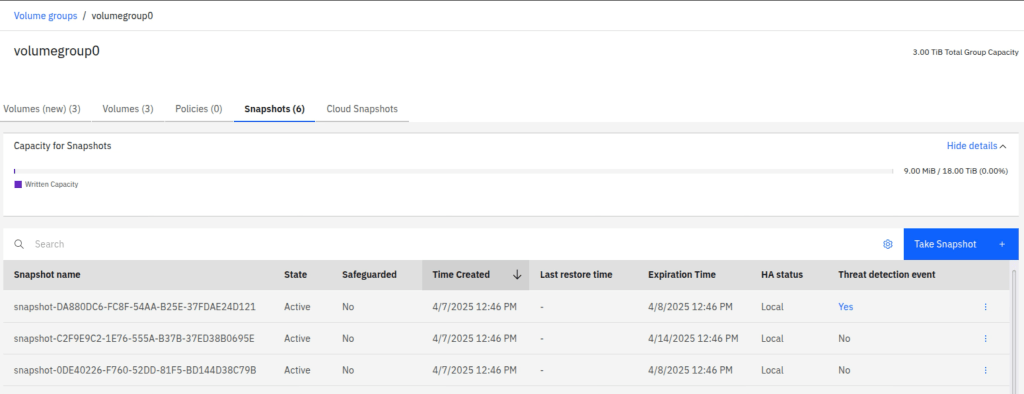
If an anomaly is logged as shown above, and there is an expiration time associated with the last known good snapshot, the expiration time for that last known good snapshot will be extended by at least 7 days post the anomaly. This gives you time to validate data, and de-risks the system expiring the last known good copy! (This feature has not yet been integrated with the HA snapshots capability)
Integrated Storage Insights Pro Advisories
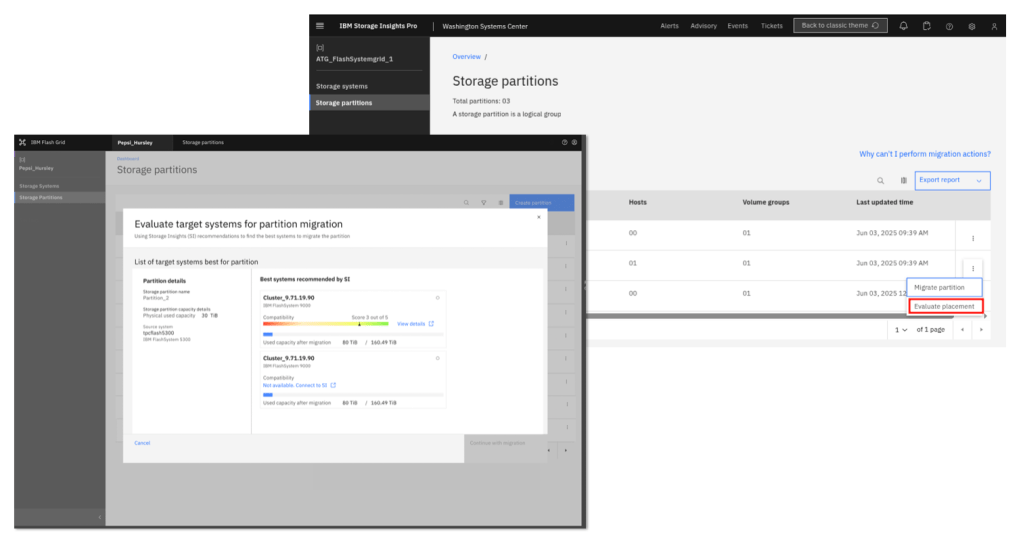
With the ever evolving AIops recommendations and advisories available in IBM Storage Insights Pro, the design team wanted to keep a consistent flow and single pane ethos by embedding suitable advisories into the native UI itself. As most users do not want to have SI Pro capable of executing tasks or sending data back to the device, a clever work around has been implemented.
SI allows you to create an API KEY for a given instance. This is used heavily by the new “Multi-tenant Dashboard” features of SI, aimed however more at service providers or business partners. This key is also used to access the SI Pro REST-API interface, so you could code and develop your own summaries or dashboards using SI data.
By creating the API KEY for your SI Pro instance, and uploading this to your FlashSystem, we can use your browser to connect to SI Pro and pull down the information to make it “look and feel” like its part of the native GUI interface, but in reality it has not connected your FlashSystem to the outside world, just used your local browser internet connection to gather the data it needs.
From 9.1.0, when registered with the instance API KEY, you will see these advisories when you evaluate target systems for Storage Partition migrations.
VASA5 Support
At a high level this allows for multiple vCenter servers to be registered with a single Virtualize system. It also provides partition support for vVols, as a way to manage these multiple registrations. This could be a whole post on its own, if you are interested in more details I will update this post when the documentation is live.
Miscellaneous Enhancements
- The code firmware packages have for some time included the FCM drive firmware packages, and last year we added the automatic update of new and replacement drives, as they transitioned into candidate state. Now, after a successful system firmware update, the FCM drives will automatically be updated in an asynchronous manner, meaning they should always be kept up to date.
- Previously, a snapshot object could be used to restore to the source volume group for the given snapshot. Now, if you have created a Thin Clone from a snapshot, the Thin Clone itself can be used to restore back to the original source volume group.
- A snapshot volume group clone object can also now be created from a subset of the volumes in the snapshot itself.
- Volumes can be addressed in the CLI or REST API using their UUID. In the past only the ID or name could be used, but anywhere that a volume ID/name was required, the UUID can now be used.
- A subset of day-to-day configuration commands can now be executed during a code upgrade (previously only view and a few service commands were possible) This includes, create,remove,modify for volumes, hosts, volume groups, host clusters, partitions, host cluster mappings and snapshots, including snapshot restore. During the final commit phase (the last ~5mins of the upgrade) these are still not possible.
- Provisioning Policies have been updated to include the “rsize” (amount of buffer space to always ensure is allocated to a thin provisioned volume) and the warning level % for the volumes.
Continued GUI Modernisation
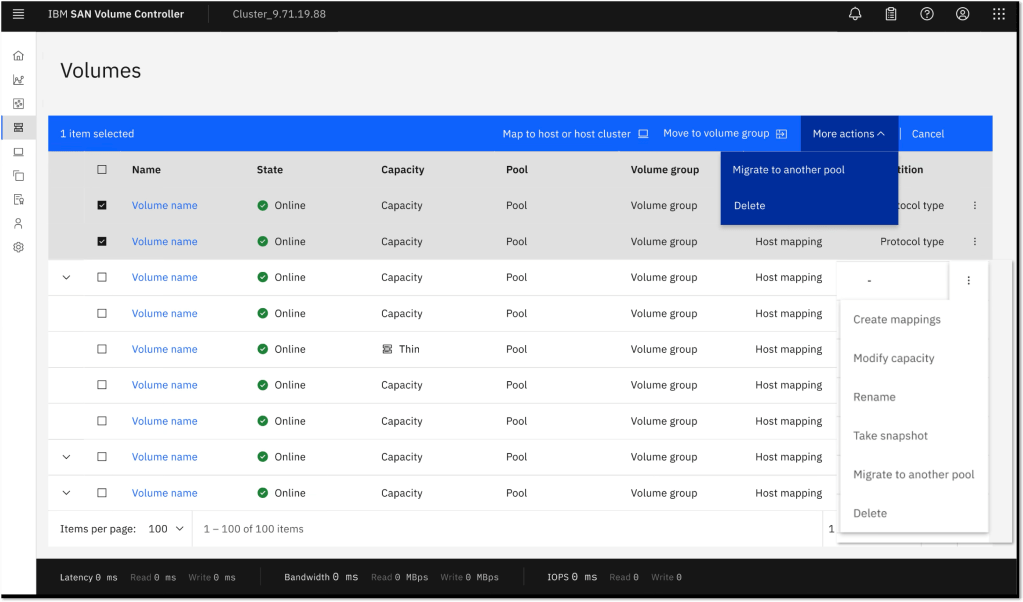
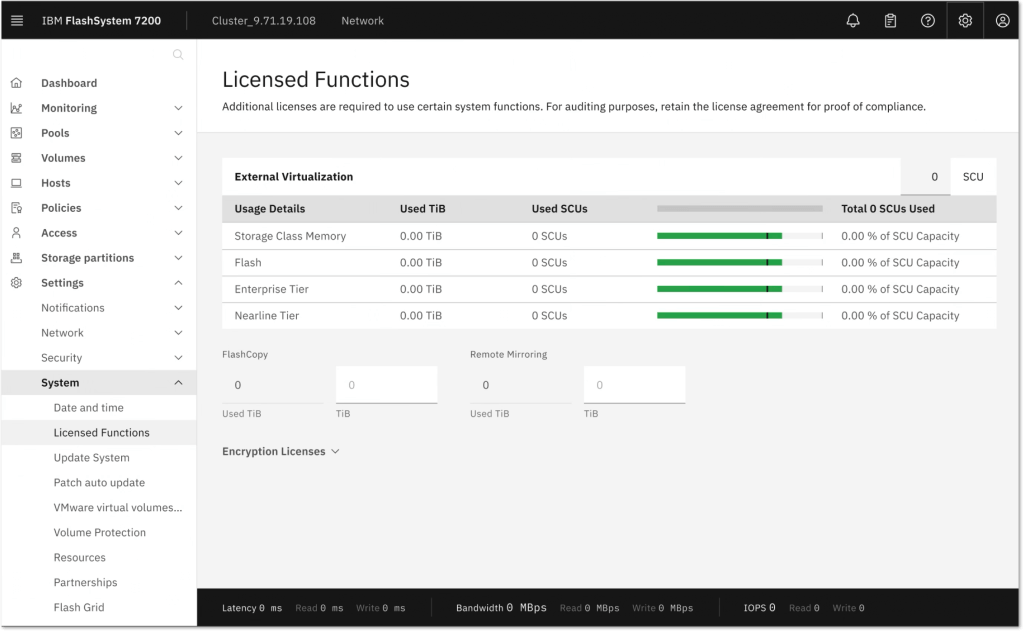
Some of the panels had not yet been updated to make use of the latest IBM Design Language and UI designs (Carbon). With 9.1.0 the Volume panels and System settings panels have been updated, or “Carbonized”
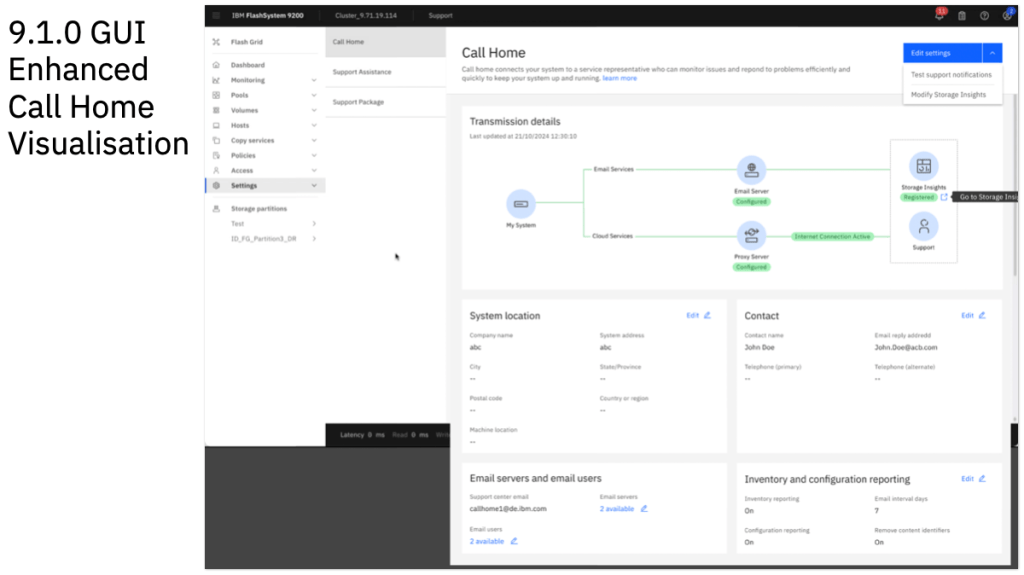
Here are a few examples, and the one which provided the most interest at recent user groups was the Call Home diagram, as there are so many methods and routes, the nice pictorial diagram will hopefully help ensure you have the cloud call home and inventory data services enabled and active! In addition, the settings are no longer nested in a second level ToC style list and are instead part of the main navigation ToC panel.



And finally…
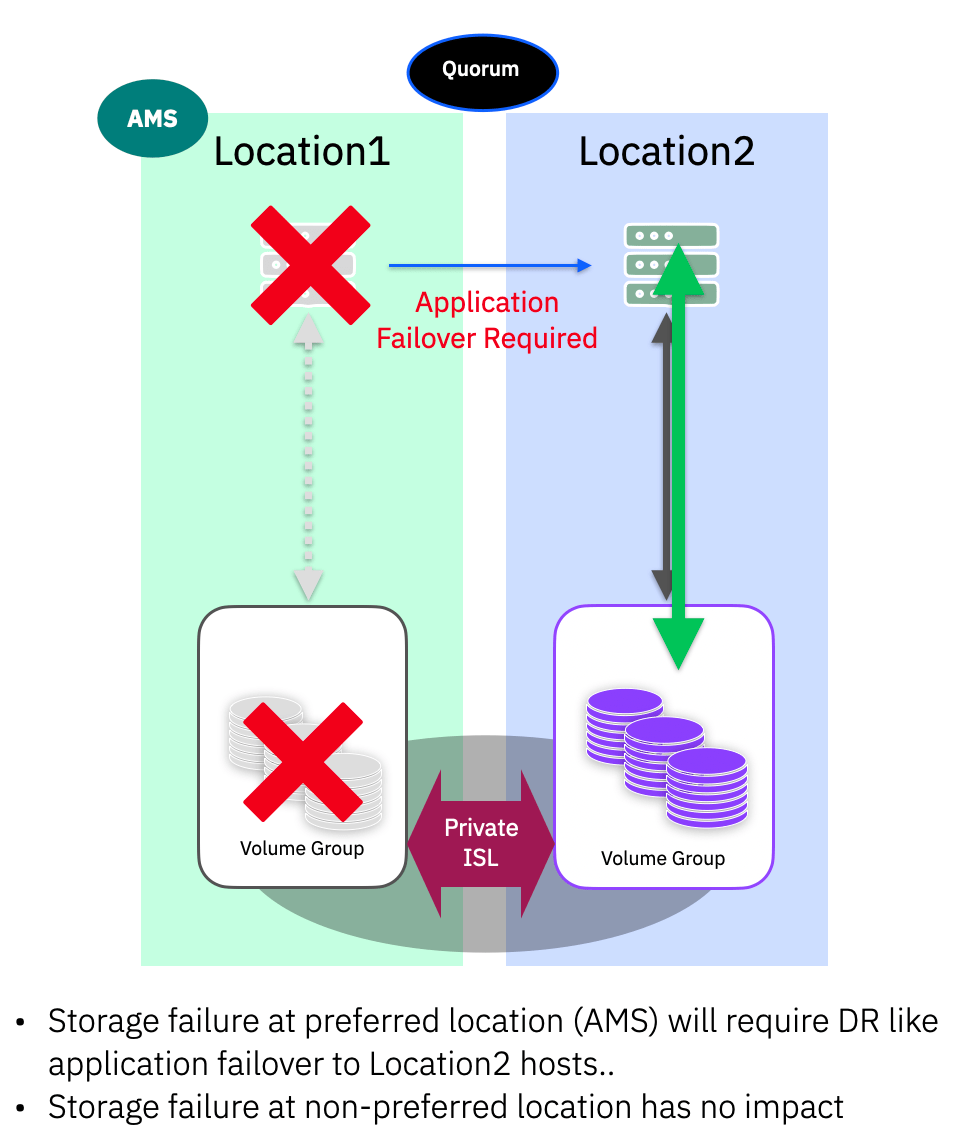
So there is a lot small changes and improvements in 9.1.0, staying true to the LTS approach with little new major functions, but don’t forget you get everything that has already been released in the 8.7.x CD versions… a very high level summary of all that you are gaining when upgrading between 8.7.0 and 9.1.0 :


 Barry Whyte and Andrew Martin : IBM Storage
Leave a reply to Anonymous Cancel reply